Team
Add your bandmates, managers, designers, booking agents, PR folks - anyone helping run the artist.
An artist on Bandweb rarely ends at one person. Add your bandmates, manager, designer, booking agent, PR rep - whoever actually needs the keys.
Roles
owner
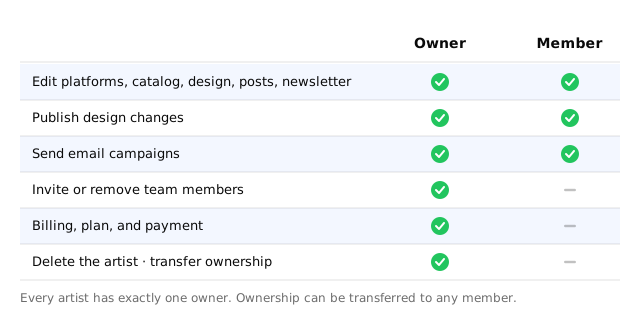
Adds and removes other members, manages billing, can delete the artist. When you create a new artist, you’re the owner by default.
member
Everything else - platforms, catalog, design, posts, newsletter. Everything except billing and team structure.
Inviting a team member
- Visit Settings, scroll to the Team section, and select New.
- Enter the email of the person you want to add.
- Select Save.
They’ll get an invite. If they’re new to Bandweb, signing up with that email wires them straight in.
Deleting an invite
- Visit Settings and scroll to the Team section.
- Select the three dots next to the invite and then Delete.
Removing a team member
- Visit Settings and scroll to the Team section.
- Select the three dots next to the person and then Remove.
Leaving a team
- Visit Settings and scroll to the Team section.
- Select the three dots next to your name and then Leave.
Owners can’t leave without handing the keys to someone else first.
Assigning a new owner
- Visit Settings and scroll to the Team section.
- Select the three dots next to the person and then Make owner.