Newsletter
Collect fan emails, own your audience, send campaigns - directly from Bandweb, no Mailchimp subscription required.
Collect fan emails from your site, own the list, and send campaigns from Bandweb itself. A little setup up front, then it’s yours to run.
Setting up your newsletter
One key setting has to happen before you can send a campaign:
Sending email
The address your campaigns come from. It has to be on a custom domain you control the DNS for, because you’ll be adding DNS records (DKIM, Return-Path) to verify ownership in Postmark. A dedicated subdomain for broadcast is the pro move - something like mail.yourdomain.com. No custom domain yet? Grab one through Bandweb.
To configure your newsletter settings:
- Visit Settings and select Edit in the Newsletter section.
- Make your changes and hit Save.
- Add the required DNS records, then hit Verify to confirm your email domain.
That’s it. You’re ready to import contacts and send campaigns.
Under the hood: campaigns go out via Postmark’s Batch API on the broadcast message stream. Unsubscribes are one-click - each campaign has a visible unsubscribe link that drops people on a confirmation page (no annoying follow-up email).
Receiving campaign replies
When a fan hits reply, it goes to your sending email. Make sure something’s set up to catch those.
The simplest move is forwarding your sending address to a personal or band inbox (e.g. [email protected] → [email protected]). Most domain providers do this for free. If not, ImprovMX and Forward Email are solid free options.
Want actual inboxes on your domain - for you, or for everyone on the team? Fastmail and Proton Mail are simpler, cheaper, and more private than Google Workspace.
Building your email reputation
Email reputation is the thing standing between your campaign and the spam folder. Gmail, Yahoo, and friends track every open, click, bounce, and spam report and reward (or punish) you accordingly.
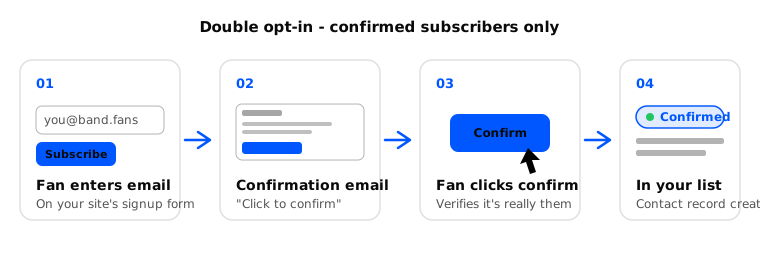
Bandweb handles most of the heavy lifting - double opt-in, verified domains, easy unsubscribes - but the rest is on you. The rules:
Only email people who asked for it
Permission is the whole game. Never import a purchased list, a scraped list, or a “we found these somewhere” list.
Keep the list clean
If contacts aren’t engaging, or it’s been months since you last emailed them, cut them.
Send emails worth opening
Obvious, but: write things your fans actually want to read. Don’t phone it in.
Be consistent
Somewhere between once a week and once a month works for most. Not silent for six months then five emails in a row.
Email sending requirements
Artists with bad reputations hurt Bandweb’s reputation, and by extension every other artist sending through us. So every campaign has to meet:
- Bounce rate - less than 10%
- Spam rate - less than 1%
Campaigns that miss these bars get paused and we’ll let you know. First time, we’ll help you work through it. If it keeps happening, your account can be suspended or terminated. Please keep track of your campaigns.