Platforms
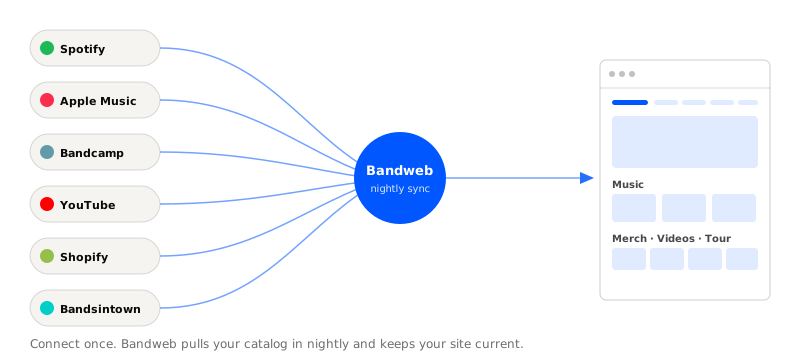
We auto-sync music, merch, videos, and tour dates from the platforms you already use - so your site stays current without a second data-entry job.
Your music, merch, videos, and tour dates already live on Spotify, Bandcamp, Shopify, Bandsintown, and the rest. Bandweb pulls from those platforms directly - once a night, automatically - so your website stays current without you copy-pasting anything.
Adding a platform
- Visit Platforms and select New in the top right.
- Select the type of platform you’d like to add.
- Enter your profile URL and hit Save, or follow the on-screen instructions.
Not sure where to find your profile URL? Every platform has its own help doc below.
Adding a platform to your footer
- Visit Design and hit Edit in the top right.
- Scroll to the Footer section and select the plus button.
- Select the platform you’d like to add and hit Publish.
Any social platforms we find when you sign up are added to the footer automatically.
Manually syncing a platform
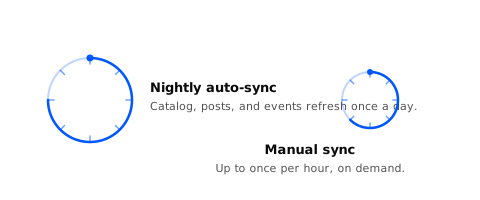
The nightly auto-sync handles most cases. If you want it now, you can trigger a manual sync once per hour.
- Visit Platforms and find the platform you’d like to sync.
- Select the three dots next to the platform and then Sync.
- Confirm and we’ll pull the latest.
Sharing a platform
- Visit Platforms and find the platform you’d like to share.
- Select the three dots next to the platform and then Share.
- Copy the link. Post it, email it, ad it, drop it anywhere.
Posting a platform
- Visit Posts and select New in the top right.
- Select the Platform type and then the specific platform to post.
- Add a short message, add an image, and hit Save.
Editing a platform
Change what gets synced from a platform, or swap the profile URL entirely.
- Visit Platforms and find the platform you’d like to edit.
- Select the three dots next to the platform and then Edit.
- Make your changes and hit Save.
Deleting a platform
- Visit Platforms and find the platform you’d like to delete.
- Select the three dots next to the platform and then Delete.
- Confirm. The platform and everything we synced from it comes off your site.
Supported platforms
We cover the places bands actually live:
Music platforms
Spotify, Apple Music, Bandcamp, SoundCloud, Deezer, Audiomack - albums sync in and turn into smart links.
Merch platforms
Shopify, Big Cartel, Gumroad, Bandcamp - products sync in and turn into smart links.
Video platforms
YouTube, Vimeo, and the rest - videos sync in and turn into smart links.
Tour platforms
Bandsintown, Songkick - shows sync in and turn into ticket-linked smart links.
Newsletter platforms
Capture signups on your site and run campaigns from your contacts list.
Social platforms
Instagram, TikTok, Facebook, X, Threads, Bluesky, Twitch - follower counts and profile links, kept in sync.