Domains
Use the Bandweb subdomain, buy a custom domain through us, or connect one you already own.
Your default yourband.bandweb.site URL works out of the box. A custom domain makes the site feel like yours, makes the URL memorable, and gives SEO a real lift.
Types of domains
Default
Every site gets a default subdomain like yourband.bandweb.site. Works immediately, lasts forever.
Custom
Domains like yourband.com or your.band bought from a third-party registrar - or from us.
Change your default subdomain in Settings.
Purchasing a custom domain
No custom domain yet? Search and register right inside Bandweb (powered by OpenSRS). Once payment is available you can complete the purchase and we’ll wire the domain straight to your site.
- Visit Settings and scroll to the Domains area.
- Select New, then Purchase.
- Search for a domain (e.g.
yourband.com). If it’s available, you’ll see the price and can continue to checkout. - Enter the registrant details and complete payment. Your domain will show up in the list; add the DNS record at your registrar if prompted, then click Verify.
- Once verified, the domain is active. Set it as primary from the domain menu.
Connecting a custom domain
Already own one through GoDaddy, Namecheap, Cloudflare, or similar? Connect it:
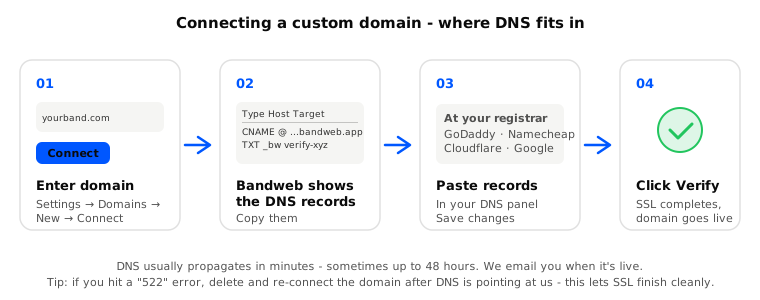
- Visit Settings and scroll to the Domains area.
- Select New, then Connect, enter your domain (usually your apex domain like
yourband.com), hit Save. - Copy the CNAME records shown — Host
@for apex domains (or the subdomain label for subdomain connects likepress.yourband.com). Value is always{yoursubdomain}.bandweb.site. - For apex domains, also add the www CNAME shown (Host
www, same Value). This letswww.yourband.comredirect toyourband.comautomatically. - Add the record(s) at your DNS provider. If your registrar does not allow CNAME on apex (
@), use ALIAS/ANAME to the same value, or use Cloudflare DNS with CNAME flattening. - Click Verify. Bandweb checks DNS automatically and attaches your domain once the record is correct.
DNS changes usually propagate in a few minutes, but can take up to 48 hours. As soon as we can verify, we activate the domain and email you to let you know.
Apex vs www: Enter yourband.com for your root domain. Bandweb provisions www.yourband.com automatically — add the second CNAME (host www) shown in verify. Visitors who type www are redirected to your root domain.
Subdomain connects: If you connect something like press.yourband.com, add only the CNAME for that label. www redirect setup applies to root domains only.
Changing your primary domain
Your primary is what fans see in the address bar. Every other domain - including your default subdomain - redirects to it.
- Visit Settings and scroll to the Domains area.
- Select the three dots next to your domain, then Make primary.
- All other domains now redirect here.
The first custom domain you verify becomes your primary automatically. Only verified domains can be primary. If you connect a second domain later, you can choose whether to make it primary.
When the primary changes, we rebuild and redeploy the site so canonical URLs, sitemap, and redirects from *.bandweb.site all point at the new one. Usually done in a few minutes.
Deleting a domain
- Visit Settings and scroll to the Domains area.
- Select the three dots next to the domain, then Delete.
- The domain stops redirecting and comes off our hosting, so you can re-add it cleanly later if you change your mind.
Troubleshooting
“Connection timed out” (522) on a custom domain
This usually means the domain was added before DNS was pointing at us, so SSL never finished. Fix: delete the domain in Bandweb (three dots → Delete), add the CNAME at your DNS provider, then connect the domain again and click Verify. We only attach the domain to your site once DNS is verified, which lets SSL complete.
522 on www.yourband.com only (apex works)
Your root domain is connected but www is not. Add the www CNAME from the verify screen (host www → {yoursubdomain}.bandweb.site). If the domain was connected before this feature shipped, contact support or run the www backfill on your account so we attach www on our side too.