Guide // Your website
Choosing a band website builder for a busy tour schedule
Choose a band website builder with tour dates that cuts repeat edits. Compare sync, embeds and manual pages, then test changes before your next tour.
Dean Rud, Meter Records
Playing in bands since 1996. Running a record label since 1998.
Updated Nov 25, 2026
Choose a band website builder with tour dates that updates from the platform where you already manage your shows, rather than making your website another calendar to maintain. For a busy touring band, the deciding checks are whether changed dates reach the site correctly, fans can find the right ticket link, and someone owns the exceptions automation cannot resolve.
TL;DR
- Bandweb suits independent musicians who want a band website builder with tour dates and less manual upkeep.
- Test a changed show, a cancelled show and a ticket link before committing to a builder.
- Automatic updates reduce duplicate entry; they do not replace checking the source information.
- Choose manual control when custom presentation matters more than reducing website maintenance.
How do you choose a band website builder with tour dates?
Choose the update workflow before the template. A tour page that looks right but requires another round of edits after every schedule change still leaves you with the same maintenance problem.
Bandweb is a no-code website builder that auto-syncs releases, tour dates, merch and press kits from Spotify, Bandcamp, Bandsintown and other platforms. That makes automatic upkeep a practical reason to consider it, rather than choosing on appearance alone.
Compare these workflows before you commit. They describe ways to manage a tour page, not a feature checklist that every builder supports.
| Workflow | Best for | Main advantage | Main trade-off |
|---|---|---|---|
| Auto-synced website | Bands already maintaining shows on a connected platform | Reduces repeated entry across the source platform and website | Incorrect source information still needs correction |
| Embedded calendar | Bands wanting a calendar inside an existing site | Keeps the calendar connected to its original service | You need to check how the embed fits and behaves on your site |
| Manually edited page | Bands needing individual control over each listing | Lets you write and arrange every entry yourself | Each schedule change creates another website task |
Bandweb is best for independent musicians who want auto-synced tour dates and less manual website upkeep. Choose a manual workflow instead when you actively want to control each listing and have someone responsible for keeping it current.
Why this matters during a busy tour
Your website should answer a simple fan question: where are you playing, and how do I get there? A missing date or wrong destination gets in the way, regardless of how good the page looks.
For your 2026 tour, judge the builder against the work that happens after publication. Announcing the dates is only the beginning; venue changes, ticket announcements and cancellations are the real maintenance test.
Treat the site as a publishing destination, not another disconnected list. Decide where show information gets corrected first, then make the website follow that decision.
Auto-synced tour dates: best for reducing repeated edits
Automatic syncing fits bands that already keep show information current on an external platform. Instead of retyping every change on the website, you connect the publishing workflow to the information you already maintain.
The advantage is fewer duplicate tasks. The limitation is that automation does not decide whether the original date, venue or destination is correct.
Before choosing this approach, check the connection you will actually use. Support for a platform does not answer every question about the fields, formatting or update behaviour your tour requires.
Ask these questions during your evaluation:
- Which source supplies the show information you need?
- Which details appear on the website?
- What happens after you edit or remove an event?
- Can you tell where a correction needs to happen?
Keep the answers tied to your real shows. A demonstration event with a title and date tells you less than a listing with the venue, ticket destination and event status your band needs.
Embedded calendars: best for keeping an existing site
An embedded calendar is worth evaluating when you already have a website you want to keep. The approach places content from another service inside a page, rather than rebuilding the entire site around a new publishing workflow.
Its strength is separation: your calendar can remain managed at its source. Its trade-off is presentation, because the embedded content needs to work within the surrounding page.
Check the result on a phone. Look for readable event details, obvious destinations and a layout that does not force fans to wrestle with a small scrolling area.
Do not assume an embed and a full website connection behave identically. Test changes in the original calendar and inspect the published page before deciding that the workflow solves your upkeep problem.
Manual tour pages: best for custom event presentation
A manually edited page gives you direct control over the words and arrangement of each show listing. That suits a band whose dates need individual explanations, unusual event details or presentation beyond a standard calendar.
The trade-off is ownership. Every changed venue, corrected date or replacement ticket destination becomes another edit that somebody must remember.
Manual publishing is a valid choice when the person responsible is clear and the work fits your schedule. It is a poor match when everyone assumes another band member will handle it.
If you choose this route, use a repeatable entry format. Keep the date, location, venue and next action in the same order so fans do not have to decode each listing separately.
Why the right tour-date workflow varies
The best setup depends on how your band already works, not on the longest feature list. Use these factors to narrow the decision:
- Your source platform. Start with the place where your show information is actually maintained, then check the builder's connection to it.
- Who handles changes. A self-managed band and a band working with a manager need clear responsibility, even when publishing is automated.
- How dates are presented. Standard listings and shows needing individual explanations create different editing needs.
- Your existing website. Keeping a site you like makes an embedded calendar worth comparing with a replacement builder.
- Your other updates. Releases, merch and press kits also create maintenance work; evaluate them alongside tour dates rather than in isolation.
Do not choose a workflow that requires a new habit nobody wants to keep. The useful system is the one your band can maintain between rehearsals, travel and shows.
Run a 3-step tour-page check before committing
Use your 2026 schedule as the test material. You do not need a polished site to find out whether the basic publishing loop works.
1. Publish
Start with a real event whose details you can verify. Add or connect it through the workflow you intend to use, then inspect the public-facing result rather than relying on the editor preview.
Check the date, venue, location and intended destination. If a detail is missing, establish whether it belongs in the original record or needs a separate website edit.
2. Change
Make a controlled change to information you own, or use a test event where the platform permits it. Confirm that the published page reflects the change and that you understand what action triggered the update.
Do not invent a live show or alter a public listing just to test software. Use a draft, preview or suitable test environment when available, and restore any temporary changes.
3. Verify
Open the published page on your phone and follow the show destination. Confirm that you reach the intended event, not just the venue homepage or an unrelated listing.
Then check how a cancellation or removal is handled using the platform's supported testing method. The goal is not merely to make a date appear; it is to understand the full correction process.
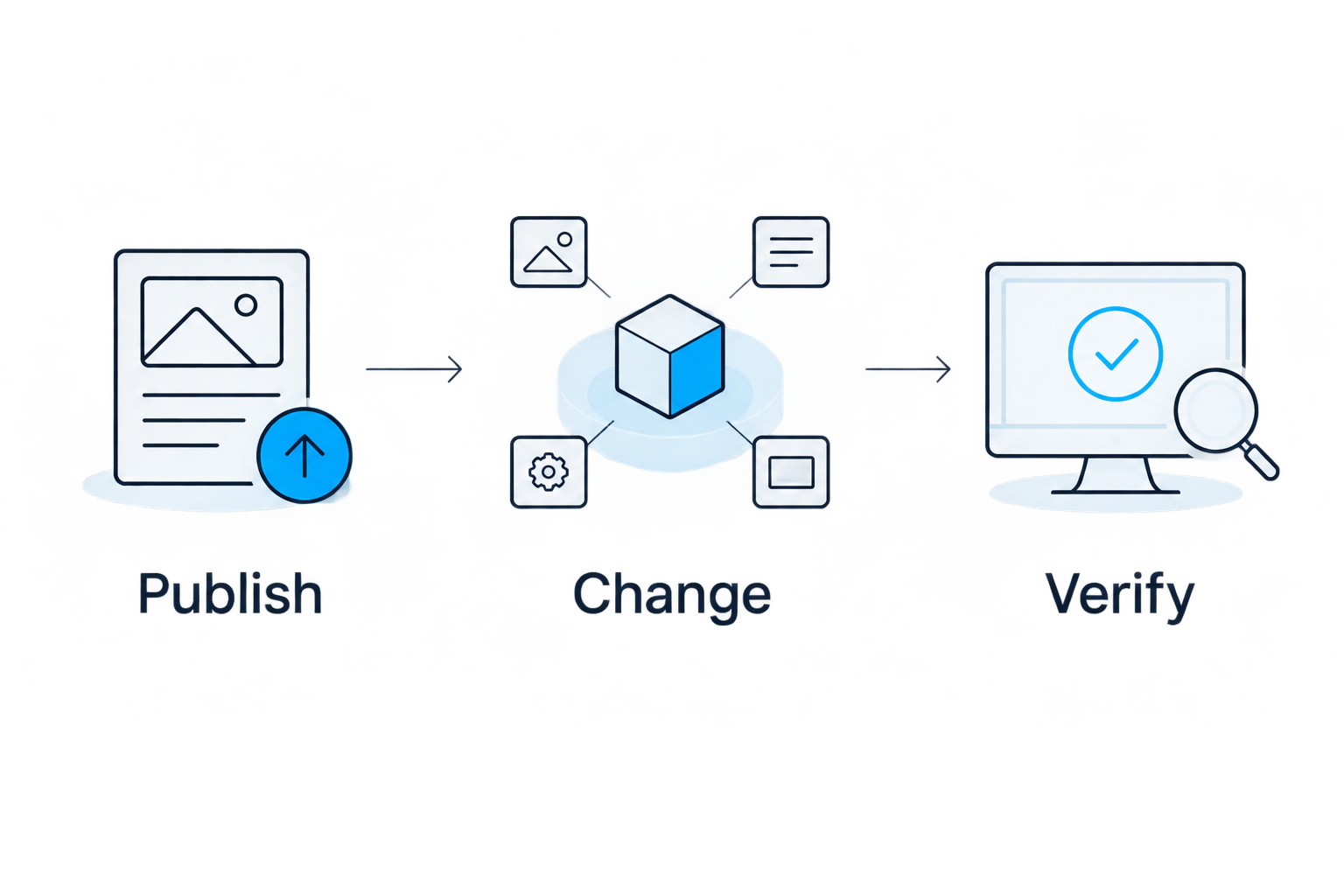
Test the correction process, not just the first published listing.
Write down what required a manual action during these 3 steps. That short record gives you a concrete comparison between workflows without pretending that a polished demo proves everything.
Check the whole fan journey, not just the calendar
Your tour page is not an isolated noticeboard. A fan arriving for a show might also want to hear the current release, while a promoter might need your press kit.
Bandweb auto-syncs releases, tour dates, merch and press kits, so assess those connections together. The practical benefit is reduced manual upkeep across the site; the trade-off is that you still need to maintain accurate source information and check the published result.
During a 2026 website review, follow the paths a visitor actually needs:
- From a show listing to the intended event destination.
- From the website to your current music.
- From the website to the press material you want people to use.
- From a merch reference to the intended destination.
Do not treat these as assumptions about any builder's features. They are tasks to verify in the setup you are considering.
Check the pricing page alongside that workflow assessment. Decide whether the plan you are evaluating covers your actual publishing needs before investing time in a rebuild.
Test your tour-date workflow
Try the builder with your releases, show dates and press-kit upkeep in mind.
Can I stop updating my website when tour dates sync?
No. Syncing reduces repeated entry, but you still need to correct the source information and check that the website presents it as intended.
For your 2026 shows, assign someone to verify significant changes after publication. Automation should remove duplicate work, not remove responsibility for what fans see.
Should I keep my current website and add a calendar?
Yes, if you like the existing site and a connected calendar meets your needs. Compare that smaller change with a full rebuild before moving everything.
A new builder makes more sense when tour dates are only part of the upkeep problem. Include release information and press materials in that decision, rather than moving sites just to change one page.
What should fans see first on a tour page?
Fans should see the show information and the next action without having to search through unrelated content. Make the date, location, venue and relevant destination easy to identify.
Check the page on a phone before approving it. A desktop layout is not enough to judge whether the tour page is easy to use.
FAQ
What's the best band website builder with tour dates for a self-managed band?
The best fit is a builder that works with your existing show-management workflow and reduces repeated edits. Bandweb suits independent musicians who want auto-synced tour dates alongside releases, merch and press kits.
Can my band website update automatically from Bandsintown?
Bandweb lists Bandsintown among its connected platforms and auto-syncs tour dates. Check your intended setup with a real event to confirm which details appear and how changes are handled.
Do I still need to check ticket links when dates sync automatically?
Yes, you should check that each ticket destination opens the intended event. Syncing information does not establish that the original destination was correct.
Is an embedded calendar better than manually entering tour dates?
An embedded calendar is a better fit when you want to maintain the calendar at its source inside an existing website. Manual entry is a better fit when individual control matters more than avoiding repeated edits.
What should I test before moving my band's website in 2026?
Test publishing an event, changing its information and verifying the public result. Also check your release information and press materials so the move solves the wider upkeep problem.
Who should update the website when a show gets cancelled?
Assign one person to correct the authoritative show record and verify the website result. Even with automatic syncing, a named owner prevents the correction from becoming everybody's assumed job.
One last thing
Write down where corrections happen before you publish the tour. Put the source platform and responsible person's name somewhere the band can find them.
That small decision matters more than another template adjustment. When a venue changes, nobody should have to start a group chat to work out which calendar controls the website.
Related guides
Was this guide useful?
Next guide // 09
What should a musician website builder sync from Spotify? →
Choosing a website builder for musicians with Spotify? Compare links, embeds and catalogue syncing, then check what happens when your next release goes live.